
Best AI Writing Tools Free Online: A Complete Comparison and Review
The best free AI writing tools online in 2026 include ChatGPT, Claude, Grammarly, and QuillBot. Each offers a usable free tier — here's exactly what you ge


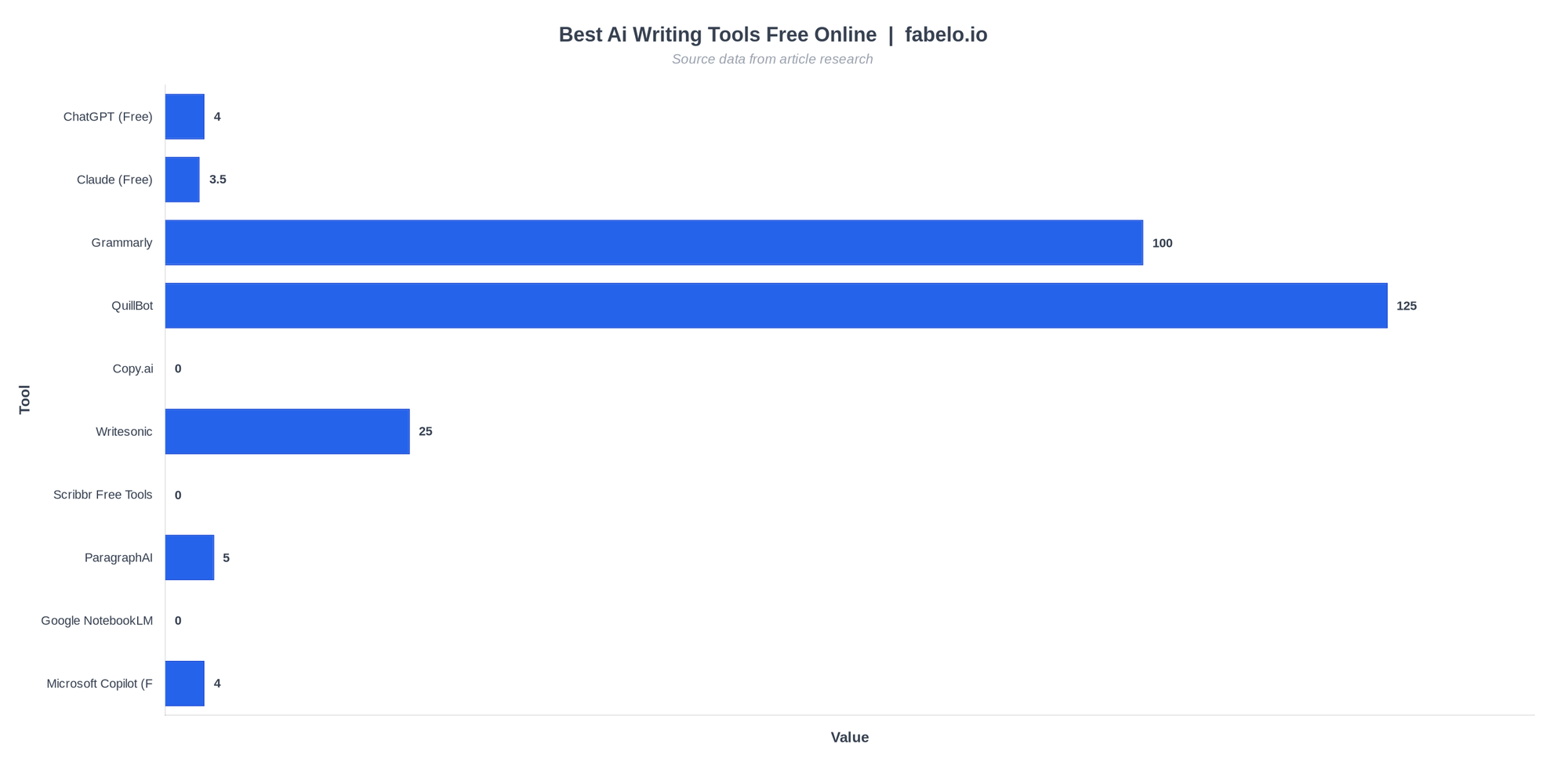
The best free AI writing tools online in 2026 give you real, usable output without spending a dollar — but the free tiers vary wildly. ChatGPT's free plan now runs on GPT-4o with no daily cap on standard prompts. Grammarly offers 100 AI prompts per month free. QuillBot lets you paraphrase up to 125 words per pass. Knowing exactly what each free plan includes saves you from hitting a paywall mid-project.
This guide cuts through the noise. Our analysis covers ten tools across content creation, copywriting, academic writing, and creative fiction. For each one, we cover what the free plan actually includes, where it cuts off, and who it genuinely makes sense for. Whether you need a free AI content generator for blog posts, a grammar assistant for emails, or a fiction brainstorming partner, there's a legitimate free option — you just need to pick the right one. If you're also thinking about how AI is reshaping the broader job market, our piece on AI-proof jobs of the future is worth a read alongside this.
Contents
- Quick Comparison: All Ten Tools at a Glance
- ChatGPT Free: Best All-Around Free AI Writing Tool
- Claude Free: Best for Natural, Human-Sounding Prose
- Grammarly: Best Free AI Writing Tool for Editing and Polish
- QuillBot: Best Free AI Tool for Paraphrasing and Summarizing
- Copy.ai Free Tools: Best for Marketing Copy and Social Content
- Writesonic: Best Free AI Content Generator for SEO Blog Drafts
- Scribbr Free Writing Tools: Best for Students and Academic Writers
- Google NotebookLM: Best Free AI Writing Tool for Research Synthesis
- Microsoft Copilot: Best Free AI Writing Tool with No Sign-Up Friction
- ParagraphAI: Best Free AI Writing App for Mobile and Multi-Platform Use
- Watch This First Before You Choose a Free AI Writing Tool
- What Real People Are Saying About Free AI Writing Tools
- How We Chose These Free AI Writing Tools
- Frequently Asked Questions About Free AI Writing Tools Online
- Final Verdict: The Best Free AI Writing Tools Online in 2026
ChatGPT Free: Best All-Around Free AI Writing Tool

ChatGPT's free tier has come a long way from its GPT-3.5 days. As of 2026, free users access GPT-4o — OpenAI's most capable publicly available model — for standard text conversations. There's no hard daily prompt limit for basic text generation, though heavy use during peak hours may route you to an older model temporarily. For most writers, that means genuinely unlimited access to a top-tier language model at zero cost.
The use cases are broad. Bloggers use it to draft outlines and introductions. Freelancers use it to write client emails and proposals. Students use it to brainstorm thesis arguments. If you're building a writing-based side hustle from home, ChatGPT's free plan can genuinely support early-stage work without any financial commitment. Marketers use it to spin up social media caption variations in seconds. Fiction writers use it to develop character backstories and plot arcs. The versatility is unmatched among free options.
The main constraint on the free plan is context window size — free users get a shorter memory window than Plus subscribers, which matters for long-form projects. You also lose access to features like Advanced Data Analysis, image generation via DALL-E, and GPT-4o's voice mode. For pure text writing tasks, though, these omissions rarely matter.
Pros
- GPT-4o access on the free tier as of 2026
- No hard daily word or prompt cap for standard text generation
- Handles every writing format: blogs, emails, scripts, fiction, academic drafts
- Massive user community with thousands of prompt templates shared online
- Custom instructions let you set your tone and style once, applied across sessions
Cons
- Shorter context window than paid tier — struggles with very long documents
- No image generation, web browsing, or file uploads on free plan
- Slower response times during peak hours
- Output can be generic without detailed, specific prompting
Who It's For
Anyone who needs a flexible, capable writing assistant across multiple formats. If you write a mix of content types — blog posts one day, emails the next, social captions the day after — ChatGPT's breadth makes it the default free starting point. It's also the strongest free option for writers who want to train the model within a session by pasting in examples of their style and asking it to match that voice.
Real-world scenario: A freelance copywriter with a handful of clients uses ChatGPT free to draft first passes on product descriptions and LinkedIn posts. She pastes a few samples of a client's existing copy into the chat, tells ChatGPT to match that tone, and gets a usable first draft in under two minutes. She then edits for accuracy and specificity. Total time saved per project: roughly 45 minutes. Total cost: $0.
Claude Free: Best for Natural, Human-Sounding Prose
Claude, built by Anthropic, consistently produces writing that reads more naturally than most competing models. The free tier gives access to Claude 3.5 Sonnet with a limited number of daily messages — the exact cap isn't published, but most users report hitting it after 10–20 substantial exchanges per day. For focused writing sessions, that's typically enough to draft and refine a full blog post or article.
Where Claude genuinely stands out is nuance and tone. It follows complex instructions well, handles sensitive topics with care, and rarely produces the robotic, hedged language that plagues lesser models. Writers working on personal essays, thought leadership pieces, or long-form editorial content will notice the difference immediately. Claude tends to produce prose you need to edit down rather than prose you need to rewrite from scratch — a much more efficient workflow.
Claude also handles long-context tasks well even on the free tier, making it useful for summarizing lengthy documents or maintaining coherence across a multi-section article. The tradeoff is that there's no persistent memory across sessions on the free plan — you start fresh each time, which can slow down projects that require consistent tone across multiple sessions.
Pros
- Among the most natural-sounding prose of any AI model available free
- Follows nuanced stylistic instructions better than most alternatives
- Strong long-context handling — useful for summarizing and restructuring long documents
- Less prone to factual hallucinations on topics with clear, well-documented answers
- Excellent for editing and rewriting tasks, not just generation
Cons
- Daily message limit can interrupt longer working sessions
- No persistent memory across sessions on the free plan
- Occasionally over-cautious on edge-case creative requests
- No image generation or file analysis on the free tier
Who It's For
Writers who prioritize quality over volume. If you're drafting a business proposal, a nuanced opinion piece, or long-form content where tone consistency matters, Claude's free tier delivers output that is genuinely harder to distinguish from human writing. Users in r/content_marketing have specifically noted that Claude 3.5 Sonnet produces the closest thing to human-like generation currently available among AI writing tools.
Real-world scenario: A marketing consultant needs to write a 1,200-word thought leadership article for a client's LinkedIn. She uses Claude's free tier to draft the piece, feeding it the client's bio, key talking points, and three examples of the client's existing writing. Claude produces a draft that captures the client's voice well enough that only light edits are needed. She hits the daily limit after one session — but the draft is done.
Grammarly: Best Free AI Writing Tool for Editing and Polish
Grammarly's free plan offers 100 AI prompts per month alongside unlimited grammar and spell-checking. That's a meaningful free tier for writers who already have drafts and need help polishing them. The browser extension is where Grammarly really earns its place — it works inside Gmail, Google Docs, LinkedIn, WordPress, and most other web-based editors, meaning you get AI-assisted editing in the tool you're already using rather than switching to a separate platform.
The AI writing features on the free plan include basic sentence rewrites, tone suggestions, and short-form generation. The 100 monthly prompts go further than they sound if you're using them for targeted rewrites rather than full-length content generation. Think: rewriting a weak paragraph, fixing a passive-voice-heavy section, or generating three variations of a subject line. Used strategically, 100 prompts support a reasonable writing workload.
Grammarly's unique value among the best free AI writing tools is its integration depth. Most free AI tools require you to copy-paste content into their interface. Grammarly comes to you. For professionals who write across multiple platforms — emails, documents, social posts, web forms — that convenience is worth a lot.
Pros
- Browser extension works inside Gmail, Docs, LinkedIn, WordPress, and more
- 100 free AI prompts per month — enough for targeted editing tasks
- Unlimited grammar, spell-check, and punctuation corrections on the free plan
- Tone detection helps writers understand how their text comes across
- Mobile keyboard app available for on-the-go writing
Cons
- 100 AI prompts disappear fast if you use them for full content generation
- Advanced style suggestions, plagiarism checker, and full rewrites require Premium
- Less capable than ChatGPT or Claude for long-form content creation from scratch
- Occasionally over-corrects idiomatic or stylistically intentional phrasing
Who It's For
Professionals and students who write in multiple places online and want editing assistance without leaving their workflow. If your bottleneck is polishing drafts rather than generating them — cleaning up grammar, improving clarity, fixing structure — Grammarly's free plan solves that problem across every platform you use.
Real-world scenario: A graduate student writes research summaries in Google Docs and submits assignments through a university portal. Grammarly's extension catches passive voice, suggests clearer phrasing, and flags unclear antecedents — all within the student's existing workflow. The 100 monthly AI prompts get used for rewriting dense paragraphs and generating clearer topic sentences. Zero platform-switching required.
QuillBot: Best Free AI Tool for Paraphrasing and Summarizing
QuillBot does one thing extremely well: it rewrites existing text. The free paraphrasing tool handles up to 125 words per pass across seven modes — Standard, Fluency, Formal, Simple, Creative, Expand, and Shorten. The summarizer tool is also available free and handles longer inputs, condensing articles and documents into concise summaries with no word cap stated on basic use. The AI Writer feature lets you generate fresh content from prompts, with the free version providing limited daily outputs.
For students, QuillBot's free suite is particularly valuable. The combination of paraphraser, summarizer, grammar checker, and citation generator — all available without a paid plan — covers most of what an academic writer needs on a daily basis. The paraphraser helps rework source material into original phrasing. The summarizer condenses readings before note-taking. The citation generator formats references automatically. These tools work independently and can be accessed without deep sign-in friction.
The 125-word paraphrase limit is the primary constraint on the free plan. Writers dealing with longer passages need to chunk their text, which slows the workflow but remains functional. Premium removes this limit and unlocks additional paraphrase modes, but the free tier is genuinely useful as-is for students and light editing tasks.
Pros
- Seven paraphrase modes available on free plan — more variety than most competitors
- Summarizer tool works on long-form content with no stated word cap on free use
- Grammar checker, citation generator, and co-writer also included free
- Clean, intuitive interface — no learning curve
- No mandatory sign-up for basic paraphrasing use
Cons
- 125-word limit per paraphrase pass requires chunking longer content
- Full AI Writer generation is limited on free tier
- Paraphrase quality can feel mechanical on the Simple and Standard modes
- Premium pricing is required to unlock synonym slider and advanced modes
Who It's For
Students, academics, and anyone who regularly needs to restate ideas in fresh language. QuillBot is the strongest free AI writing tool for students who need to paraphrase sources, summarize readings, and check grammar — all within a single platform that doesn't require a credit card.
Real-world scenario: An undergraduate writing a 15-page research paper uses QuillBot to paraphrase six journal article passages (chunking each into 100-word sections), summarize two long review papers for her literature section, and auto-format her APA citations. She completes the entire paper using only the free plan. The work that would have taken three hours of manual rewording takes about forty-five minutes.
Copy.ai Free Tools: Best for Marketing Copy and Social Content
Copy.ai maintains a suite of free individual tools — a marketing email generator, social media caption writer, blog intro generator, product description tool, and more — accessible without a subscription. These aren't trial versions with limited outputs; they're standalone generators built for specific marketing use cases. Each tool accepts a short input (product name, key benefit, target audience) and returns multiple copy variations instantly.
The free tools hub is particularly useful for small business owners and solopreneurs who need marketing copy on a budget. You're not getting a full content creation platform on the free tier, but you're getting purpose-built generators for the copy types that matter most to marketers. Need five variations of a Facebook ad headline? The ad copy generator handles that. Need a professional cold outreach email? The email generator works well for that use case.
Copy.ai's full workflow platform (with brand voice settings, long-form blog tools, and AI agents) sits behind a paid plan, but the free individual tools remain functional and aren't artificially throttled. For specific, short-form marketing copy tasks, this is one of the most practical writing AI tools free online options available.
Pros
- Multiple purpose-built free tools, not a single generalized generator
- Designed specifically for marketing copy — output is more ready-to-use than generic AI
- No credit system on the free individual tools
- Useful for anyone who needs fast social captions, email subject lines, or product descriptions
Cons
- Long-form content creation and brand voice tools require a paid plan
- Free tools are siloed — no unified workspace to manage multiple copy pieces
- Output quality varies by tool; some generators are stronger than others
- No editing interface — you get output and copy-paste it yourself
Who It's For
Small business owners, ecommerce sellers, and social media managers who need short-form marketing copy fast and can't justify a paid subscription. If your writing needs are primarily campaign-oriented — ads, emails, captions, product descriptions — Copy.ai's free tools hit the specific use cases well.
Writesonic: Best Free AI Content Generator for SEO Blog Drafts
Writesonic offers 25 free credits per month as a trial — not a permanent free tier, but functional enough to test the platform's core capabilities. Those 25 credits go toward generating blog articles, landing page copy, product descriptions, and more. The platform's standout feature is its SEO-oriented content editor, which integrates keyword suggestions and readability scoring alongside AI generation.
For content marketers who are evaluating paid AI writing platforms, Writesonic's free trial is genuinely one of the better test environments available. The blog article generator produces structured drafts with H2 headings, intro paragraphs, and conclusion sections — not just raw text dumps. The quality is solid for initial drafts that still need human editing before publishing, which is the right expectation for any best free AI content generator.
The credit system does mean Writesonic isn't technically unlimited-free the way ChatGPT or Claude are. But for users who need occasional blog drafts and don't want to manually prompt a general-purpose chatbot, Writesonic's structured templates produce more publish-ready output per prompt.
Pros
- SEO-integrated content editor — keyword targeting built into the generation workflow
- Structured blog article templates produce more organized output than raw chat prompts
- 25 free monthly credits let you generate several complete blog drafts
- Wide range of templates: ads, landing pages, emails, product descriptions
Cons
- 25 credits/month is a trial, not a permanent free plan — limited long-term utility without paying
- Credit consumption isn't always transparent — longer outputs use more credits
- Requires sign-up and some onboarding before generating content
- Output still requires significant editing for brand voice and factual accuracy
Who It's For
Content marketers and bloggers who want to evaluate a dedicated AI writing platform before paying, or who need occasional structured blog drafts and can work within a modest monthly credit allocation. It's also the strongest option if SEO optimization is a priority in your content workflow.
Scribbr Free Writing Tools: Best for Students and Academic Writers
Scribbr offers a focused suite of free writing tools specifically designed for academic contexts: a paraphrasing tool, grammar checker, summarizer, and an AI humanizer. These tools require no sign-up, work directly in the browser, and are optimized for the kinds of writing tasks students face most often — paraphrasing source material, cleaning up grammar, condensing dense readings, and making AI-assisted writing harder to flag with detection tools.
The lack of a required account is genuinely unusual in this space. Most free AI writing tools require at least an email sign-up to access features. Scribbr's no-account tools are accessible immediately, which matters when you're in the middle of an assignment and need a quick assist without committing to another platform relationship.
The tools are more limited in scope than QuillBot or Grammarly — there's no full AI writer, no long-form generation, and no integration with other platforms. But for the specific academic writing tasks they're built for, they perform well and don't require the user to wade through features they don't need.
Pros
- No sign-up required — tools work immediately in-browser
- Academic-specific focus: paraphrasing, summarizing, grammar checking, humanizing
- Clean interface with no upsell friction on the core free tools
- Particularly useful for the final editing stage of student writing
Cons
- No full-length content generation — these are editing and refinement tools only
- Word limits on paraphrasing and summarizing tools
- No browser extension or integration with Google Docs or Word
- Narrower feature set than QuillBot or Grammarly
Who It's For
Students who need fast, no-friction access to paraphrasing and grammar tools without creating another account. Scribbr's free tools are the cleanest option for free AI writing tools no sign up in an academic context. If you're a student who already has ChatGPT for generation and Grammarly for editing, Scribbr's humanizer tool adds one more useful layer for free.
Google NotebookLM: Best Free AI Writing Tool for Research Synthesis
Google NotebookLM is fully free and backed by Google's infrastructure. It's not a general-purpose writing generator — it's a research synthesis tool that reads your uploaded sources (PDFs, Google Docs, web URLs, YouTube links) and then answers questions, generates summaries, creates mind maps, and even produces audio overviews based on that source material. For writers who work from research, it fundamentally changes how quickly you can move from raw material to structured output.
According to the Andy Stapleton YouTube channel, NotebookLM has become a near-daily tool for serious research and academic writing — specifically because it can generate mind maps, infographics, and slide decks from uploaded papers, outputs that were extremely difficult to produce with AI tools even a year ago. The ability to upload multiple sources and query across all of them simultaneously makes it invaluable for literature reviews, long-form journalism, and research-based content creation.
The limitation is the input requirement — NotebookLM isn't useful without sources to work from. You can't type in a topic and get a blog post back. But for writers who are synthesizing research, building arguments from evidence, or managing large amounts of source material, it's the most capable free tool on this list for that specific workflow.
Pros
- Completely free with a Google account — no usage caps stated on core features
- Reads and synthesizes PDFs, Docs, web URLs, and YouTube transcripts
- Generates mind maps, summaries, audio overviews, and slide decks from source material
- Answers questions with citations pointing to the specific source passage
- Updated frequently — new output formats added regularly
Cons
- Requires uploaded sources — not useful for writing without existing research material
- Not a general-purpose AI writer for generating fresh content from scratch
- Output quality depends heavily on the quality and relevance of your sources
- Requires a Google account
Who It's For
Researchers, graduate students, journalists, and long-form content writers who work from sources. If you regularly read papers, articles, or reports before writing, NotebookLM compresses that research phase dramatically. It's the strongest free option for anyone writing content that needs to be grounded in specific sources rather than generated from general knowledge.
Microsoft Copilot: Best Free AI Writing Tool with No Sign-Up Friction
Microsoft Copilot is powered by GPT-4 and available free through the Bing interface with a Microsoft account. For users already in the Microsoft ecosystem — Windows, Edge browser, Outlook, Teams — the integration is seamless. Copilot appears in the browser sidebar, in Windows search, and within Microsoft 365 apps (though the in-app Word and Outlook features require a paid Microsoft 365 Copilot license). The standalone web version is free and fully capable for general writing assistance.
What sets Copilot apart among free options is its web access. Unlike the free ChatGPT tier, Copilot can search the web in real time to support its writing — useful for writing pieces that need current information, like news roundups or trend pieces. It can also generate images through DALL-E integration on the free tier, which adds a content creation angle beyond pure text.
Pros
- GPT-4 powered on the free tier
- Real-time web search — can incorporate current information into writing
- Deep integration with Windows, Edge, and Microsoft 365 apps
- Free image generation via DALL-E included
- Accessible without a separate account if you use Windows with a Microsoft login
Cons
- In-app Word and Outlook Copilot features require a paid Microsoft 365 Copilot license
- Less flexible for creative writing tasks than Claude or ChatGPT
- Conversation history management is less intuitive than ChatGPT's interface
- Heavy Bing branding can feel limiting for users who prefer a neutral writing environment
Who It's For
Windows and Microsoft 365 users who want a capable free writing assistant without adding another tool to their workflow. If you're already living inside the Microsoft ecosystem, Copilot is the path of least resistance to a GPT-4-powered writing assistant at no cost.
ParagraphAI: Best Free AI Writing App for Mobile and Multi-Platform Use
ParagraphAI offers five free uses per day across its mobile app, browser extension, and web platform. The tool covers a wide range of writing tasks — emails, messages, essays, content — and is particularly well-optimized for mobile writing. The keyboard integration on iOS and Android means you can use AI assistance directly inside any app on your phone, not just inside ParagraphAI's own interface.
Five uses per day is a real constraint, but for someone who needs occasional AI assistance on the go — a professional who needs help drafting a firm but polite reply to a client email, for instance — it's genuinely useful. The mobile-first design makes ParagraphAI one of the few writing AI tools with a free plan that feels designed for phones rather than retrofitted to work on them.
Pros
- Mobile keyboard integration works inside any iOS or Android app
- Covers emails, essays, messages, and content in a single app
- Browser extension available for desktop use
- Tone customization built into the free plan
Cons
- Five uses per day is a hard limit — not suitable as a primary writing tool
- Limited output length on the free tier
- Less capable than ChatGPT or Claude for complex, nuanced writing tasks
Who It's For
Professionals who primarily write on their phones and need AI assistance for short-form tasks — emails, replies, brief messages — without switching to a laptop. If your bottleneck is mobile writing quality rather than desktop content volume, ParagraphAI's free plan serves that use case well.
Quick Comparison: All Ten Tools at a Glance
| Tool | Best For | Free Plan Details | Sign-Up Required |
|---|---|---|---|
| ChatGPT (Free) | General writing, drafts, brainstorming | GPT-4o access, no prompt limit on standard use | Yes |
| Claude (Free) | Human-like prose, long-form content | Limited daily messages on Claude 3.5 Sonnet | Yes |
| Grammarly | Editing and polishing existing writing | 100 AI prompts/month, unlimited grammar checks | Yes |
| QuillBot | Paraphrasing, summarizing | 125-word paraphrase limit per pass, summarizer included | Yes (optional) |
| Copy.ai | Marketing copy, social posts | Free tools hub with multiple generators | Yes |
| Writesonic | Blog drafts, SEO content | 25 credits/month free trial | Yes |
| Scribbr Free Tools | Academic writing, citations | Free paraphraser, grammar checker, summarizer | No |
| ParagraphAI | Multi-platform quick writing | 5 uses per day, mobile-friendly | Yes |
| Google NotebookLM | Research synthesis, academic writing | Fully free, no usage caps stated | Google account |
| Microsoft Copilot (Free) | General writing via Bing integration | GPT-4 powered, free with Microsoft account | Microsoft account |
Watch This First Before You Choose a Free AI Writing Tool
Before committing to any platform, it's worth watching the Andy Stapleton YouTube channel's breakdown of AI tools for 2026. Watch: the Andy Stapleton YouTube channel on the best AI tools for 2026 →
One insight from that video that directly applies here: Google NotebookLM's ability to generate mind maps, infographics, and structured slide decks from uploaded research papers is described as something that was "near impossible to produce with AI" just a year ago. That's a meaningful signal for writers who work from sources — NotebookLM's free capabilities have expanded significantly, and many writers haven't caught up to what it can now do. If your writing process involves synthesizing multiple sources before drafting, NotebookLM deserves serious consideration as part of your free toolkit, even if you use ChatGPT or Claude for the actual writing.
What Real People Are Saying About Free AI Writing Tools
The honest picture from actual users is more nuanced than most review articles suggest. In r/WritingWithAI, a user with two years of experience using AI writing tools went looking for a solution with no credits, no tokens, and no word limits — and found the search genuinely difficult. The consensus in that thread was that truly unlimited free AI writing tools essentially don't exist in 2026; every major platform either caps usage, degrades free-tier model quality, or hides the most useful features behind a paywall. ChatGPT's free tier comes closest to genuinely unlimited for text generation, but even that has constraints around context length and advanced features.
Users in r/humanizeAIwriting debating the best free AI essay writer generally land on ChatGPT as the top recommendation, while noting that reliability is uneven — the output quality varies significantly based on how well you prompt the model. Multiple users in that thread describe "training" ChatGPT within a single conversation by pasting in examples of their target writing style, which produces noticeably better results than cold prompting. This is a practical tip that applies across all the general-purpose tools on this list.
In r/WritingWithAI, when users discuss online tools specifically, Claude comes up repeatedly for its flexibility and writing quality — though users note that the free tier's message limits make it a supplement to ChatGPT rather than a full replacement. The overall picture from these communities: the best free setup in 2026 is a combination of tools rather than a single platform — typically ChatGPT for volume and versatility, Claude for quality and polish, and either QuillBot or Grammarly for editing.
How We Chose These Free AI Writing Tools
Our analysis focused on tools that offer a genuinely usable free tier — not a one-time trial that expires after a week, and not a "free" plan that blocks every interesting feature behind a paywall. Each tool on this list was evaluated against the same set of criteria, and tools that didn't meet the threshold for the free tier were excluded regardless of how strong their paid plans are.
The evaluation criteria applied to every tool:
| Criterion | What We Looked For | Weight |
|---|---|---|
| Free Tier Usability | Can you complete a real writing task without paying? Is the free plan functional or just a teaser? | High |
| Output Quality | Does the AI produce writing that requires light editing, or does it require a full rewrite? | High |
| Use Case Fit | Is the tool built for a real writing need, or does it try to do everything poorly? | Medium |
| Access Friction | How hard is sign-up? Does it require a credit card? Can you access it immediately? | Medium |
| Platform Coverage | Does it work on web, mobile, inside other apps? Or only on one platform? | Lower |
| Free Plan Longevity | Is the free tier permanent, or is it a trial that expires? | Medium |
Tools excluded from this list include Jasper AI (no meaningful free tier — trials are limited and require a credit card), Sudowrite (subscription-only, no real free plan), and several smaller tools where the "free" plan is effectively a 3-use demo. We also excluded tools that have strong free functionality but are not primarily writing tools — for example, Notion AI has AI writing features, but they're add-ons to a productivity app rather than a writing tool in its own right.
The tools reviewed here represent a cross-section of use cases — general generation, editing and polish, academic writing, marketing copy, and research synthesis. No single tool won across all categories, which is why the final recommendation section offers a use-case-based decision guide rather than a single "best" pick for everyone. Our analysis also drew on independent testing from Email Vendor Selection's comprehensive 2026 AI writing tool review and firsthand testing data published on Medium's AI writing tool comparison with detection software.
Frequently Asked Questions About Free AI Writing Tools Online
Which AI writing tool is genuinely 100 percent free with no credit card required?
ChatGPT's free plan is the most accessible — sign up with just an email address, no credit card needed, and access GPT-4o for standard text tasks with no hard prompt limit on basic use. Google NotebookLM is also fully free with a Google account and has no stated usage caps. Scribbr's tools work with no sign-up at all. If you need zero financial commitment and maximum output volume, ChatGPT is the answer.
How do I get AI to write a full blog post for free without running out of credits?
Use ChatGPT's free plan — it handles full blog post generation without a credit system for standard text. Prompt it in stages: ask for an outline first, then expand each section individually. This reduces the context load per prompt and produces more focused output per section than asking for the whole post in one shot. If you want more structure, Writesonic's 25 monthly free credits can generate one or two complete blog drafts with SEO headings already formatted.
What is the best free AI writing tool for students who need to avoid AI detection?
Scribbr offers a free AI humanizer tool specifically designed to rewrite AI-generated text in a way that reduces detection flags — no sign-up required. QuillBot's paraphraser (free up to 125 words per pass) also changes sentence structure enough to lower detection scores on most tools. The more effective long-term strategy is using AI for outlines and research synthesis, then writing the actual text yourself — using Claude or ChatGPT to refine your own draft rather than generate it wholesale.
Can I use free AI writing tools for commercial content like client work or published articles?
Generally yes — the major free plans (ChatGPT, Claude, Grammarly, QuillBot) don't restrict commercial use in their standard terms of service. However, always verify the specific terms for the tool you're using, as they do update. The bigger practical consideration is that AI-generated commercial content requires substantial human editing for accuracy, originality, and brand voice before publishing. Free tools produce usable first drafts, not ready-to-publish copy.
What's the best free AI tool for creative fiction writing specifically?
Claude's free tier produces the most natural, varied prose of any free option — fiction writers consistently note it repeats itself less and maintains narrative consistency better than ChatGPT for longer creative pieces. ChatGPT is more flexible for experimental or genre-specific requests. For dedicated fiction tools, Sudowrite has a strong reputation for creative quality, but it has no meaningful free plan. For zero-cost fiction assistance, Claude paired with ChatGPT (for brainstorming and worldbuilding) is the strongest free combination available.
Do free AI writing tools work for non-native English speakers writing in English?
Yes, and this is actually one of the strongest use cases for free AI writing tools. Grammarly's free grammar checker catches idiomatic errors, word choice issues, and sentence structure problems that are common in non-native English writing — and the browser extension applies these corrections across every platform you write on. ChatGPT can rewrite drafts in more natural American English if you ask it to "improve the English naturalness" of your text. For non-native speakers producing professional or academic writing in English, this combination is genuinely transformative.
How do the best free AI writing tools online compare to paid tools like Jasper or Copy.ai Pro?
The gap has narrowed significantly in 2026. ChatGPT and Claude on their free tiers run on models that are comparable to or better than what dedicated paid tools like Jasper were offering a year ago. Paid tools still win on workflow features — brand voice settings, team collaboration, SEO integrations, and content calendar tools. But for raw writing quality and generation volume, the free tiers of the major general-purpose AI models now give you most of what you're paying for in dedicated writing platforms.
Final Verdict: The Best Free AI Writing Tools Online in 2026
The top pick overall for the best free AI writing tools online is ChatGPT's free plan. GPT-4o access with no credit-based usage cap, combined with the broadest range of writing use cases of any free tool, makes it the default starting point for virtually every writer. Whether you're drafting blog content, writing emails, generating social copy, or working on fiction, ChatGPT handles it — and the user community around prompt strategies is large enough that you'll find tested approaches for almost any writing task.
But the smartest approach in 2026 isn't picking one tool — it's building a free stack. ChatGPT for generation. Claude for polish and quality-checking. Grammarly's extension for in-context editing across every platform. Add QuillBot if you do academic writing that requires paraphrasing, and Google NotebookLM if you work from research sources. That combination covers every stage of the writing process at zero cost. Understanding how AI tools are reshaping professional work more broadly is also worth your time — our guide to future-proofing your career from AI disruption covers the bigger picture for knowledge workers navigating this shift.
The only honest caveat: truly unlimited free AI writing without any constraints doesn't exist. Every platform has some limit — daily messages, monthly credits, context window size, or feature access. The tools on this list give you the most usable free capability for the widest range of writing tasks. Verify current free plan details directly on each tool's website before committing to a workflow, as these tiers do change.
About the Author
Written by Ufuk Yorulmaz
Digital entrepreneur and AI systems builder based in Istanbul. Founder of Fabelo.io, Aicall.pw (AI voice call automation), and WPcare. Has led digital strategy, automation, and SEO systems at PanicWorkz for over 16 years. Writes about AI tools, automation trends, and the future of work at Fabelo.
Disclaimer: This article is for informational purposes only. AI tool capabilities and pricing change frequently — verify before committing.
Last updated: April 16, 2026 · fabelo.io